Display Options in Recipient Details Inactive
Problem
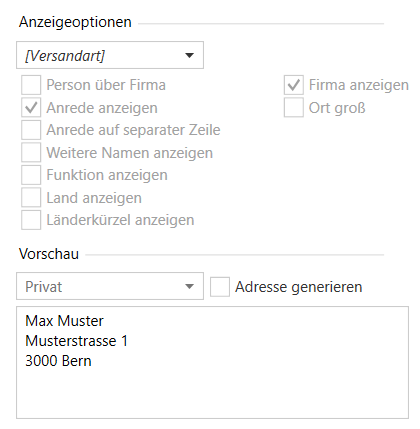
After creating a contact from the clipboard in the recipient dialog, the display options in the recipient window are inactive as shown in the image. Why?
Solution
As shown in the image, the checkbox "Generate address" for automatic generation of the address block is deactivated. Currently, the choice of its value (active or inactive) depends on how the contact was entered.
When using the button "Create new contact from clipboard", this checkbox is initially not activated, but can be manually activated directly after creating the contact, as shown in the image above.
The reason is that OneOffixx takes the complete address from the clipboard, which is the intended purpose of the button. It is assumed that the correct address is stored somewhere, is copied, and should be entered exactly as a OneOffixx recipient. In the less common case that the address is not exactly right, it can be changed manually.