Template Creation: Classic vs. Web-Capable
Are you planning an update from OneOffixx to primedocs, or have you already made the switch and are interested in the possibilities that the web-capable template world in primedocs offers? Read on! Especially with Word, you have a choice between two different template architectures. What are the differences between the web-capable template world and the classic world?
Every primedocs solution depends on the specific use case of your organization. Let our product specialists advise you!
First, the most important key differences between the two template worlds are highlighted. Then we go into technical depth and examine the differences at the template creation level. Finally, the differences of specific features are compared:
Key Differences
The following are the most important key differences between the web-capable (primedocs) template world and the classic template world (template types with "classic" suffix).
| primedocs | classic (OneOffixx) |
|---|---|
Templates are web-capable. This means users can generate documents from primedocs Web, a web application accessed in the browser (https://your-domain/app). Documents are assembled in primedocs Web and then downloaded by the browser. | The classic template world is not web-capable. |
| Documents can be generated from external applications via primedocs Connect. | Documents can be generated from external applications (e.g. SharePoint) via OneOffixx Connect. Connect also offers invoking templates via the Shell or the Protocol Handler (as a link). |
| Documents from primedocs templates can be generated via a Web API. primedocs Web can be integrated into the following applications: Microsoft Teams, Microsoft SharePoint, CMI Web | OneOffixx does not offer a Web API. |
| The template creation process is based on the inheritance from Style through Layout to Content. The entire document generation pipeline is validated. | The template creation process is based on the inheritance from Style through Layout to Content (and optionally Function), as well as document functions at the respective hierarchy level. Inherited document functions can be supplemented or overridden at each hierarchy level. |
Template Creation Process
The template creation process and its logic are explained here for both template worlds. This section is very technical and is only recommended for template creators who regularly edit templates and work with layouting in OneOffixx/primedocs.
ℹ️ Info In the text below, within the template hierarchy "Content" refers to the "Content Template" level, "Layout" refers to the "Layout Template" level, and "Function" refers to the "Function Template" level. For clarity, these terms are abbreviated to "the Content/Layout/Function".
| primedocs | classic (OneOffixx) |
|---|---|
| The template creation process is not based on inheritance and overriding. This means that in a document generation pipeline, a field may be defined exactly once. | The template creation process is based on inheritance and overriding. |
| The template hierarchy consists of three levels: Style, Layout, and Content, where the Style is the underlying level for all templates. | The template hierarchy consists of three levels: Style, Layout, Content, and optionally Function, where the Style is the underlying level for all templates. |
| The organization to which a profile belongs inherits the Designs (colors and fonts as well as bullet points for PowerPoint & Excel). | The Style inherits via the "Office Themes" document function Themes (colors and fonts) as well as images (logos) per theme. This allows a logo to be displayed in color or black-and-white in the Word ribbon. |
| The Style level inherits the Styles / Word format templates defined in the Word template. | The Style level inherits the Styles / Word format templates defined in the Word template, as well as the Themes (see above). |
| The Layout level inherits the headers and footers in the Word template, and the placeholders created in the placeholder definition. | The Layout level inherits the headers and footers in the Word template, and every configured document function. |
| The Content level fills the layout placeholders with data via placeholder mapping, and defines data. | The Content level inherits everything from the Layout, defines the template content, defines new data (e.g. DP fields or CustomDataNodes), and optionally overrides data (e.g. DP fields, DP View, or CustomDataNodes). |
| There is no Function template type. | The Function level inherits everything from the Content, defines new data (e.g. DP fields or CustomDataNodes), and optionally overrides data (e.g. DP fields, DP View, or CustomDataNodes). A function template without attached document functions inherits everything from the Content and can thus be saved as a shortcut in template folders. |
| Each document function belongs to a level or template type and can only be defined there. Each field, whether from the Forms or Fields document function, can exist exactly once in the document creation pipeline. Overriding is therefore not possible. | Document Parameters: If a DataNode was configured in a layout template, the Content inherits it. In the Content, this DataNode can be overridden by using the same ID. The View cannot be supplemented at a lower hierarchy level (e.g. Content). A View configured in the content template therefore replaces a View set in the layout template. Scripts: If a Script (a CustomDataNode) was configured in a layout template, the Content inherits it. This also applies to references from Global Configurations, e.g. {[Scripts.MyScript]}. If a Script was configured in a Content, the function template inherits it. In the Content, a script can be overridden by using the same ID. The same applies between Function and Content. If a reference from Global Configurations was made in a Content, e.g. {[Scripts.MyScript]}, a script with the same ID cannot be created again in the same configuration. This also applies to the function template. |
| Global Configurations are typed, meaning that during document generation, it is first checked whether the corresponding global entry was referenced in the correct document function. For example, a global entry of type "FieldsGlobalFields" cannot be referenced in the Forms document function. | Global Configurations are untyped, meaning that exactly where the reference was made, the corresponding text is inserted during document generation without any validation. This text can be anything: a document parameter View, the Items of a ComboBox, Datanodes, or a script excerpt thereof. |
| The configuration is checked and validated throughout the entire template hierarchy by primedocs, thus reducing problems. This allows controlling whether the configuration is correct, logical, and meaningful. | The configuration is not checked by primedocs throughout the template hierarchy – the result, i.e. what is ultimately displayed in the generated document, is only correct if the layouter has configured everything correctly. |
| Because a field may be defined exactly once in the template hierarchy and global entries are typed, the software can perform exact validation during the document generation process. This offers the following advantages for layouters: If a form or field is incorrectly configured, the layouter finds out when clicking "Test Document". The document may not even be created before the error is corrected. | No validation is performed during the document generation process. This means the contents of scripts or document parameters are not checked for correctness. No errors or warnings are given. Scripts or document parameters that have been incorrectly configured are displayed as empty in a generated document. The layouter is responsible for correct creation. |
| Through software-side validation, the layouter receives great support for troubleshooting when problems occur. | Due to the lack of validation, the layouter must go through the template hierarchy and perform troubleshooting independently when problems occur. |
Comparison of Document Functions and Features
Template Types
primedocs
Word
- Content
- Layout
- Style
PowerPoint & Excel
- Excel Template
- PowerPoint Master Template
- PowerPoint Slide Template
- PowerPoint Template
- Image Gallery
- Chart Template
Outlook
- Email Template
- Signature
classic (OneOffixx)
Word
- Content (classic)
- Function (classic)
- Layout (classic)
- Theme (classic)
- Address Cover Page (classic)
- Labels (classic)
- Campaign (classic)
PowerPoint & Excel
- Excel Template (classic)
- PowerPoint Template (classic)
Outlook
- Campaign
- Signature
- Disclaimer
- Email Theme
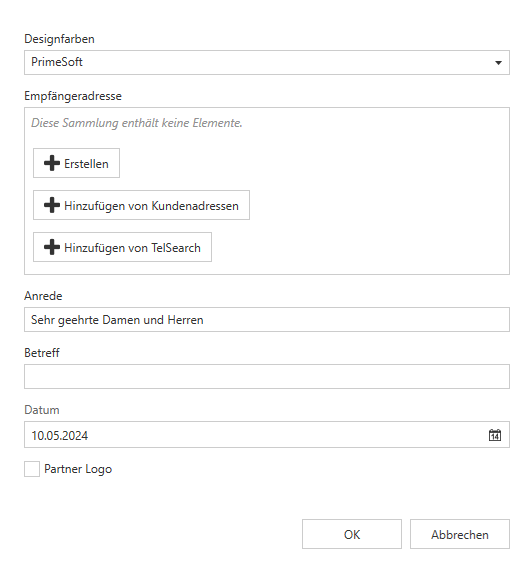
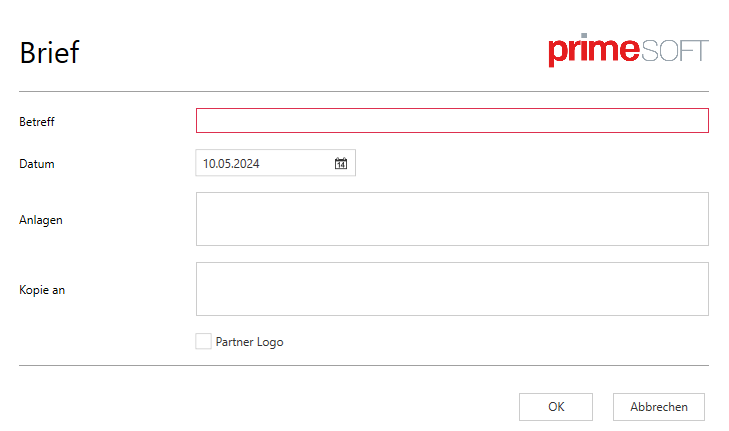
Data Entry Forms: Document Parameters (DP) | Forms
primedocs
- Available fields: Textbox, Date field, Checkbox, Dropdown
- Simple structures and dependencies between fields on one level can be mapped.
Example:
classic (OneOffixx)
- Available fields: Textbox, Date field, Checkbox, Dropdown, Radio button
- Complex structures and dependencies between fields can be mapped.
Example:
Object Entry Forms: Recipient Dialog | ObjectCollections/Objects
| primedocs | classic (OneOffixx) |
|---|---|
| ObjectCollections have no standard schema. This can be defined completely individually per Forms definition. | The recipient dialog and its schema are predefined by the software, i.e., there are fixed fields with their IDs and labels. This schema is called Standard Contact Mapping. |
| A separate ObjectCollection with the fields necessary for the type is created in a schema per type. Example: Template Minutes: one schema each for "Attendees" (fields: First Name, Last Name, Department, Has Chair, Takes Minutes), "Copy To" (fields: First Name, Last Name, Email), "Excused" (fields: First Name, Last Name, Email, Receives Copy) | A recipient can be added to one of the categories "To", "Cc", and "Bcc". Example: Template Minutes: the categories are renamed to "Attendees", "Copy To", and "Excused" |
| ObjectCollections can therefore be used for all types of objects you want to bring into documents: recipients, invoices, projects, etc. | The recipient dialog is for this reason only designed for addresses. |
| Data interfaces can be defined and stored globally, through which the user can access any data. | Address interfaces can be defined and stored globally, through which the user can access addresses. |
| Through the individual definition of the schema, exactly the fields needed for the respective template are configured. | Additional fields ("ExtendedFields") can be configured. |
| Since object fields are individually created, there is no such automatism. | The recipient dialog automatically assigns the salutation and the most likely letter salutation based on the first and last name. |
Dynamic Content: Scripts | Fields
| primedocs | classic (OneOffixx) |
|---|---|
| There is no inheritance, because definition occurs exclusively in the "Content" template type or in Global Configurations. | Scripts are inherited. |
| In a document generation pipeline, each Field exists exactly once. | Scripts are overridden. |
| Fields get their dynamic behavior with JavaScript. JavaScript allows much more complex logic than the previous XML. | Scripts get their dynamic behavior with XML. The XML contains attributes developed by PrimeSoft that only allow a limited implementation of logic. For example, loops are not possible as in JavaScript. |
| Available Field types: Text, FormattedText (text block type), WordContent (text block type), Date, Picture, YesNo | Available Scripts: CustomDataNode with the following types: Text Script, Snippet Script, Image Script |
| During a document update, Fields are updated within 1–2 seconds depending on complexity. | During a document update, Scripts are updated within 2–10 seconds depending on complexity. |
Text Blocks
| primedocs | classic (OneOffixx) |
|---|---|
There are two text block types: 1. Word Content (WordContent): counterpart to the classic text block of type "Formatted Text (Open XML)" (see point 1 in the right column). 2. Formatted Text (FormattedText): through this type it is possible for the first time to pack dynamic content with different formatting into a Field. FormattedText can be created in two ways: as a saved text block, or as a Global Translation of type "FormattedText", defined with HTML and placeholders. | There are three text block types: 1. Formatted Text (Open XML) → Most commonly used type. We assume this type is used. 2. Formatted Text (RichText) → practically never used. 3. Unformatted Text → practically never used. |
| Text blocks can be saved in the text block group "Template Text Blocks". | Text blocks can be saved in the text block groups "Shared Text Blocks", "Template Text Blocks", and "Private Text Blocks". |
| WordContents are currently only used by layouters for dynamizing templates. Users who are not templating administrators still save their private or shared text blocks as "Formatted Text (Open XML, classic)". | Text blocks are created by layouters for dynamizing templates as well as by users without admin rights for private or shared text blocks. |
| Text blocks are brought into a template via Fields. | Text blocks are brought into a template via Scripts. |
| Not all content can be saved in a WordContent. Content is deliberately enabled by our development team – this way potential problems can be controlled. E.g., images currently cannot be saved in WordContents; however the allowed content is continuously being expanded. | Practically any content is allowed in a text block. The only known problems exist with section breaks and embedded objects such as Excel workbooks. |
| The identification feature for Fields is the text block key (Snippet key). | The identification feature for Scripts is the text block ID. |
| The definition of fields in WordContents is checked during document generation (SnippetPlaceholder). This means errors can be traced quickly. | Fields in Snippets are not checked during document generation for whether they are filled. This means they may be displayed incorrectly or not at all if configured incorrectly. This means errors can be difficult or impossible to trace. |
| It is currently possible to output Word-native fields and plain text in WordContent. | It is possible to insert all types of fields (document parameter fields, scripts, Word-native fields) except snippet scripts in snippets. |
Global Configuration: Typed | Untyped
primedocs
As above: Global Configurations are typed, meaning that during document generation, it is first checked whether the corresponding global entry was referenced in the correct document function. For example, a global entry of type "FieldsGlobalFields" cannot be referenced in the Forms document function.
This enables validation of the entire document generation pipeline.
classic (OneOffixx)
As above: Global Configurations are untyped, meaning that exactly where the reference was made, the corresponding text is inserted during document generation without any validation.
This text can be anything: a document parameter View, the Items of a ComboBox, Datanodes, or a script excerpt thereof.
Therefore, no validation is possible, meaning data in a generated document may be incorrect.