Metadata
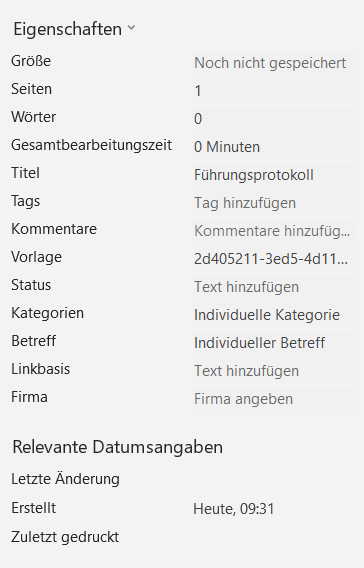
Using this document function, document properties ("Core Properties") and extended document properties ("Custom Document Properties") can be added for Microsoft Word, Excel and PowerPoint templates.
Eigenschaften
The default properties correspond to the "OpenXML-PackageProperties" and can be configured this way:
<Metadata>
  <Core>
    <Category>Category</Category>
    <ContentStatus>Status</ContentStatus>
    <ContentType>Type</ContentType>
    <Creator>Testuser</Creator>
    <Description>Description</Description>
    <Identifier>Identifier</Identifier>
    <Keywords>Keywords</Keywords>
    <Language>EN</Language>
    <LastModifiedBy>TestUser</LastModifiedBy>
    <Subject>Subject</Subject>
    <Title> Title</Title>
    <Version>Version</Version>
    <LastPrinted>2022-04-02</LastPrinted>
    <Modified>2022-06-02</Modified>
    <Created>2022-06-26</Created>
  </Core>
</Metadata>
Each of these elements can access existing data, e.g. from the Document Parameter, via the XPath attribute.
<Metadata>
  <Core>
    <Subject XPath="//Text[@id='DocParam.Subject']">Subject</Subject>
  </Core>
</Metadata>
NOTE
LastPrinted, Modified and Created are date values.
Advanced properties
In Word, the advanced document properties can be accessed as follows:
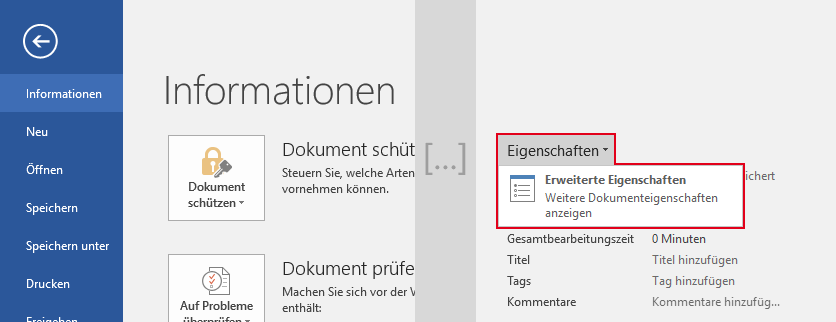
Via "Customize" they can be displayed and edited:
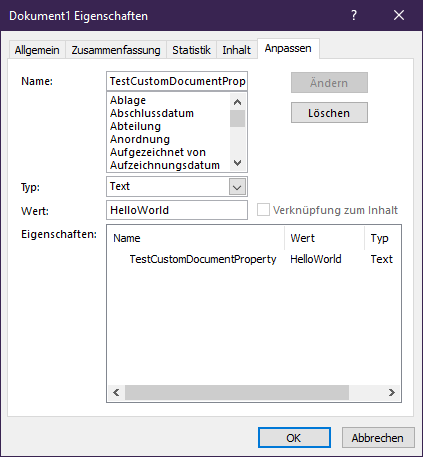
Supported Types
| Type | Type acc. to English word | Example values |
|---|---|---|
String | Text | Example text, Hello World |
Int | Number | 1, 7635 |
Double | Number | 42.66, 1.725, 4 |
Bool | Yes or No | true, false |
Date | Date | 2023-01-23 |
Similar to the "Core-Properties", existing data can be read out via the XPath attribute.
primedocs document properties
There are some special extended document properties that have an effect in primedocs. These are extended document properties of type Bool.
| Name | Effect |
|---|---|
OORefreshFieldsOnOpen | If true: The primedocs add-in updates the following Word fields each time the file is opened. |
OORefreshFieldsOnSave | If true: The primedocs add-in updates the following Word fields before each save. |
Word fields:
- WdFieldType.wdFieldEditTime
- WdFieldType.wdFieldFileName
- WdFieldType.wdFieldFileSize
- WdFieldType.wdFieldGlossary
- WdFieldType.wdFieldLastSavedBy
- WdFieldType.wdFieldNumChars
- WdFieldType.wdFieldNumPages
- WdFieldType.wdFieldNumWords
- WdFieldType.wdFieldPage
- WdFieldType.wdFieldPageRef
- WdFieldType.wdFieldPrint
- WdFieldType.wdFieldPrintDate
- WdFieldType.wdFieldSaveDate
- WdFieldType.wdFieldSection
- WdFieldType.wdFieldSectionPages
- WdFieldType.wdFieldTOA
- WdFieldType.wdFieldTOAEntry
- WdFieldType.wdFieldTOC
- WdFieldType.wdFieldTOCEntry
- WdFieldType.wdFieldFootnoteRef
- WdFieldType.wdFieldDocProperty
- WdFieldType.wdFieldIncludePicture
For more information on the field types click here: https://docs.microsoft.com/en-us/office/vba/api/word.wdfieldtype .
Updates in the open document
If you update the document e.g. by changing the document parameters, the properties and extended properties will also be updated based on the configuration. However, there are restrictions for the properties, because not all "OpenXML-PackageProperties" can be used in Word.
The following properties can also be updated in an open document via primedocs:
CategoryCreatorDescriptionKeywordsLastModifiedBySubjectTitle- As well as all "Advanced Properties"
Examples
Fixed values
<Metadata>
  <Core>
	<Category>Test Category</Category>
  </Core>
  <Meta Name="CustomDocumentPropertyStringExample" Type="String">some text</Meta>
  <Meta Name="CustomDocumentPropertyIntExample" Type="Int">264</Meta>
  <Meta Name="CustomDocumentPropertyDoubleExample" Type="Double">15.723</Meta>
  <Meta Name="CustomDocumentPropertyBoolExample" Type="Bool">true</Meta>
  <Meta Name="CustomDocumentPropertyDateExample" Type="Date">2023-12-31</Meta>
</Metadata>
primedocs texts with fallback
<Metadata>
  <Core>
    <Category XPath="//Text[@id='DocParam.Category']">Test Category</Category>
  </Core>
  <Meta Name="DocumentParameterSubject" Type="String" XPath="//Text[@id='DocParam.Subject']">some text</Meta>
</Metadata>
→ The value is taken from the Document Parameter DocParam.Subject or DocParam.Category. If no value is found, the defined value ("Test Category" or "some text") takes effect.
Enable special primedocs document properties
<Metadata>
  <Meta Name="OORefreshFieldsOnOpen" Type="Bool">true</Meta>
  <Meta Name="OORefreshFieldsOnSave" Type="Bool">true</Meta>
</Metadata>
→ Here is configured that the Word add-in updates all Word fields on every open and before every save (see ["Special primedocs document properties" above]).
Another example
<Metadata>
  <Core>
    <Subject>Individual subject</Subject>
    <Status>Individual status</Status>
    <Category>Individual category</Category>
    <Title XPath="//Text[@id='Forms.Title']">Fallback if no title appears</Title>
  </Core>
</Metadata>