Generic DMS Integration
NOTE
This document function is intended for the integration of DMS systems in the OneOffixx Ribbon for the end user and can therefore not be controlled via Connect or similar. The support is limited in the current version to DMS systems which are integrated in the Windows file system.
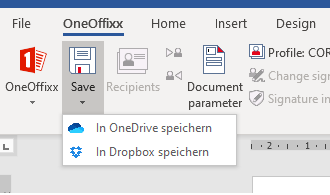
This document function provides certain basic functionality to integrate OneOffixx documents into document management systems. For this purpose, storage locations for templates are defined and are displayed in the OneOffixx ribbon:

It is also possible to store multiple locations in the same template:
Configuration
Example:
<Configuration>
  <SaveLocation DisplayName="Save to OneDrive">
    <Path>%userprofile%\OneDrive</Path>
    <FileNameElement>Forms.Subject</FileNameElement>
    <Description>Save to the personal OneDrive folder.</Description>
    <Icon><!--Base64 encoded PNG--> </Icon>
  </SaveLocation>
  <SaveToOutput DisplayName="Via Output Management">
    <Description>DMS-Integration-Test with Output – Description</Description>
    <Icon><!--Base64 encoded PNG--> </Icon>
    <DesktopOutput>
      <Fields>
        <Text Name="Guid">
          <Code>
            function main() { return $.util.generateGuid(); }
          </Code>
        </Text>
        <Text Name="FileName">
          <Code>
            function main() { return "X:\\Documents\\Test_single_Document_" + $("Guid") + ".docx"; }
          </Code>
        </Text>
      </Fields>
      <Commands>
        <SaveFile field-FileName="FileName" CreateFolder="true">
          <Document />
        </SaveFile>
      </Commands>
    </DesktopOutput>
  </SaveToOutput>
</Configuration>
SaveLocation
Elements for SaveLocation:
| Id | Description |
|---|---|
| DisplayName | Display name or text that is displayed in the Word ribbon. |
| Description | Description which will be displayed in the Word selection dialog (CTRL+S). |
| Path | Pre-selected path for this location. Cannot be set together with PathElement. |
| PathElement | Id for an element such as a script or document parameter field for a dynamic preselected save path. Cannot be set together with Path. |
| FileName | File name preselected for this location. Cannot be set together with FileNameElement. |
| FileNameElement | Id for an element such as a script or document parameter field for a dynamic preselected storage path. Cannot be set together with FileName. |
| Icon | Base64 encoded PNG. The image will be displayed in the Word Ribbon. |
Use Global Translations as usual to translate values, especially DisplayName or Description.
SaveToOutput
ℹ️ Info This configuration also supports advanced scenarios, such as file uploads via HTTP. All options of the Output Management are available.
This element is available from primedocs version4.0.30096.0onwards.
Elements for SaveToOutput:
| Id | Description |
|---|---|
| DisplayName | Display name or text that is displayed in the Word ribbon. |
| Description | Description which will be displayed in the Word selection dialog (CTRL+S). |
| Icon | Base64 encoded PNG. The image will be displayed in the Word Ribbon. |
| DesktopOutput | The element corresponds to DesktopOutput in the Output Management |
Use Global Translations as usual to translate values, especially DisplayName or Description.
Access to “classic” fields:
All primedocs fields that are also present in the document can be accessed. The . in the field name must be replaced with an _.
Example:
$("Profile_OrganizationUnitId") (. becomes _, so that the Fields engine can process it.).