Address interfaces (classic)
The functions mentioned here are only available in the ‘classic’ templates. Please find more information here.
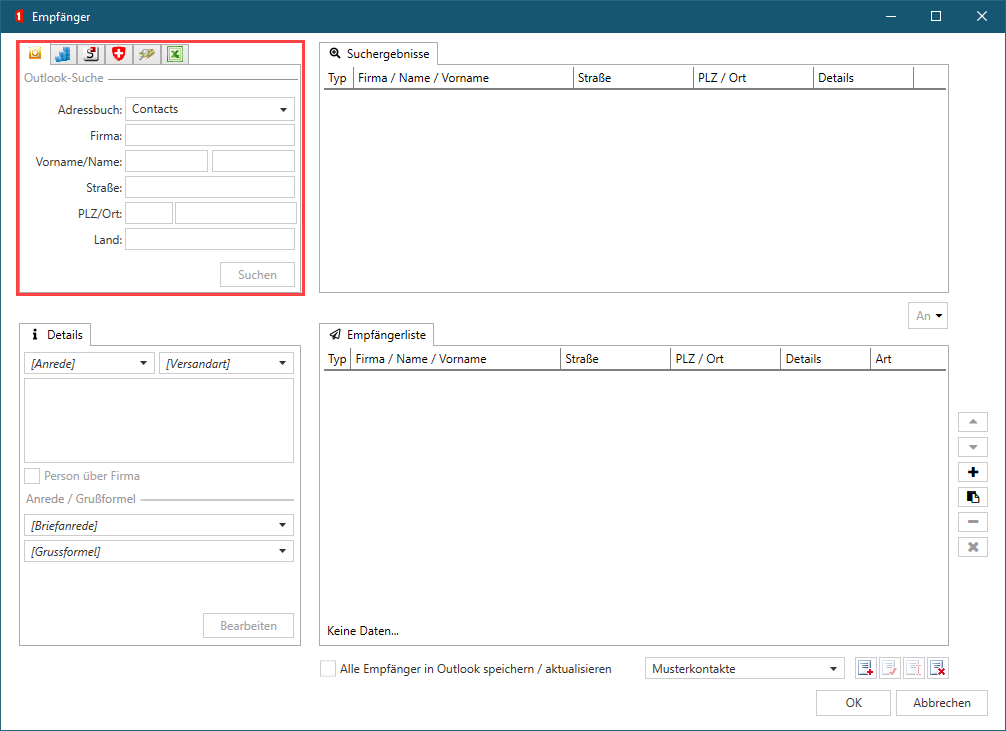
The address interfaces are needed for the document function Recipient address.
The address providers are plug-ins that implement an interface to an address source. The use of the address providers can be connected with license costs. In the following overview you can see all address providers we offer. By clicking on an address providers you will find more detailed explanations and at least one sample configuration for the respective interface:
| Type | Id | Name |
|---|---|---|
| Server | E10A8313-A92D-4CB2-A12B-9AEB58F39207 | Server based address providers |
| Client | 833075BF-DDE5-4E9B-83B9-E9803C96E391 | Abacus |
| Client | F3D23EE5-F722-4082-842C-1168F7FDF1B8 | Cobra |
| Client | 328E6C4E-549B-4108-8ED2-D76B7E422F6B | Creativ |
| Client | 8C51B042-81EA-46E3-A429-821641E19A6A | Generic SQL |
| Client | 00BA9804-2430-4585-AE60-FCCA29909781 | LDAP |
| Client | 6EA5E6E3-1329-4B02-8779-0952C1119A15 | Lotus Notes |
| Client | A244D5EF-93F6-4A2C-9B62-F6DA64590B8C | Microsoft Outlook |
| Client | 121CE113-143E-4125-980A-20B6341F9FC9 | Microsoft Dynamics |
| Client | 739DEC43-D4F0-47F6-ADDD-C6AC73A93B02 | Microsoft Navision |
| Client | 96078EBE-4A8F-4D53-883E-9E9D0F07BC2A | Microsoft SharePoint |
| Client | B16EC67C-444E-46DC-A659-93E95BB4EB4D | NEST |
| Client | C6445223-DEBE-4817-9E50-E843F507C1BC | RUF |
| Client | 6A3354D7-6423-48C0-A3F0-F636E606196D | SAP Puls |
| Client | D66AA3D8-B184-4AED-BE93-6AA86FA1867E | TelSearch.ch |
| Client | 5f4865d3-9d7e-47bd-846d-546f7f7dd0ad | UserDefinedAddressProvider e.g. for Excel |
| Client | 0861976E-318F-41A1-AE45-6D894A7E7292 | Vertec |
Configuration
The following parameters can be applied in all address providers:
<AddressProvider id="nguid" order="0" active="true" hiddenIfNotAvailable="true">
  <Debug>false</Debug>
  <Uri></Uri>
  <Timeout></Timeout>
  <EnableProxyCredentials>false</EnableProxyCredentials>
  <ProxyCredentialsName></ProxyCredentialsName>
  <ProxyCredentialsPassword></ProxyCredentialsPassword>
  <DetailsColumnMapping>//AddressProviderData/@Id</DetailsColumnMapping>
  <Visibility>
    <VisibleFor>S-1-2-34-5678901234-5678901234-567890123-4567</VisibleFor>
    <VisibleFor>S-9-8-76-5432109876-5432109876-543210987-6543</VisibleFor>
  </Visibility>
</AddressProvider>
Attributes
- id GUID of the address provider.
- order In which order the provider tab is displayed in the recipient dialog.
- active If on
true, the dialog is displayed. - hiddenIfNotAvailable If on
true, the dialog will not be displayed if the address source is not accessible.
By the id the corresponding address provider is loaded. An address provider itself can also be defined multiple times, but the correct Id must be configured.
Elements
- Debug Extended output in the log file.
- Uri (Optional) URL to WS addresses.
- Timeout (Optional) Maximum waiting time until results are delivered by the web service.
- EnableProxyCredentials (Optional) If a proxy is operated in the LAN, login data can be overwritten in the proxy. Otherwise they will be inherited from Internet Explorer.
- ProxyCredentialsName (Optional) Proxy login name.
- ProxyCredentialsPassword (Optional) Proxy password.
- DetailsColumnMapping (Optional) Maps contact details to the details column in the result list. An XPath with appropriate access to the contact element must be specified. Examples:
./Person/LastName,./AddressProviderData/@Id,./ExtendentFields/Item[@Key='Dynamic.Detail']. - Visibility (Optional) If this parameter is set, only the specified AD users and AD groups will see this address interface. The permission works on the white-list principle. For each SID a
VisibleFortag is required. The SIDs can be read in the OneOffixx admin dashboard or via the Windows console with the commandwhoami /all. If this parameter is not set, the interface is visible to all users.
Icon
Some address providers can be provided with an icon, which is then displayed in the recipient dialog.

Configuration:
<Icon>iVBORw0KGgoAAAANSUhEUgAAACAAAAAgCAMAAABEpIrGAAAAAXNSR0IArs4c6QAAAARnQU1BAACxjwv8YQUAAAMAUExURQAAAOIaAOIbAeMbAuMcAuMdA+MeBeMfBuMgB+MiCeQjCuQkC+QkDOQnD+UqEuUrE+UsFOUvF+UxGeY0G+Y0HOY4IOc7JOc+J+hBKuhBK+hFL+hFMOhJM+lJNOlPOupUQOtVQetWQutaRutdSuteS+xiT+xnVe1rWe1tXO1vXu5zYu50ZO51Ze93Z+54aO95ae96ae98be+Cc/CBcfCDdPCFd/CGePGJevGKfPGLffGMf/GNgPGOgfKShPKUh/OYjPOZjfOckPSjmPSnnPWsovato/aupvayqfa0q/e4r/e4sPe5sfe6svi9tvjCuvjFvvnIwfnLw/nOyPrQyvrTzvrUzvvc1/ve2vzf2/zh3v3o5f3o5v3r6P3s6v7v7f7w7/7y8f708v729f739v/49//6+v/8+//8/P/9/f/+/v///wAAAAAAAAAAAAAAAAAAAAAAAAAAAAAAAAAAAAAAAAAAAAAAAAAAAAAAAAAAAAAAAAAAAAAAAAAAAAAAAAAAAAAAAAAAAAAAAAAAAAAAAAAAAAAAAAAAAAAAAAAAAAAAAAAAAAAAAAAAAAAAAAAAAAAAAAAAAAAAAAAAAAAAAAAAAAAAAAAAAAAAAAAAAAAAAAAAAAAAAAAAAAAAAAAAAAAAAAAAAAAAAAAAAAAAAAAAAAAAAAAAAAAAAAAAAAAAAAAAAAAAAAAAAAAAAAAAAAAAAAAAAAAAAAAAAAAAAAAAAAAAAAAAAAAAAAAAAAAAAAAAAAAAAAAAAAAAAAAAAAAAAAAAAAAAAAAAAAAAAAAAAAAAAAAAAAAAAAAAAAAAAAAAAAAAAAAAAAAAAAAAAAAAAAAAAAAAAAAAAAAAAAAAAAAAAAAAAAAAAAAAAAAAAAAAAAAAAAAAAAAAAAAAAAAAAAAAAAAAAAAAAAAAAAAAAAAAAAAAAAAAAAAAAAAAAAAAAAAAAAAAAAAAAAAAAAAAAAAAAAAAAAAAAAAAAAAAAAAAAAAAAAAAAAAAAAAAAAAAAAAAAAAAAAAAAAAAAOq7jwsAAAEAdFJOU////////////////////////////////////////////////////////////////////////////////////////////////////////////////////////////////////////////////////////////////////////////////////////////////////////////////////////////////////////////////////////////////////////////////////////////////////////////////////////////////////////////////////wBT9wclAAAACXBIWXMAAA7DAAAOwwHHb6hkAAAAGXRFWHRTb2Z0d2FyZQBwYWludC5uZXQgNC4wLjE3M26fYwAAATdJREFUOE+d0VdTwkAUBWAXsYCiiL33riiKFTt2sWIDxIItOf//fd0WEpgNmfE8JHfv/SabTaqoR/4DiLrLlAIiohYyRSBnIqojI4AaWCnZRAvq+EVFC95Pppr5vQyEY4AoKIDfm3inqG0wlGV9UdHejbTJFk+7fQ4QN1hLgdEAicylPoGUAyT53NqicDbTQoKXmHeAxWMbtMeuvs27tRxaHSBAbDDZREITh6+4ZwexX9IBjJ/r5Q6SQMINhKdPP/CYAzuEHiy0kfqRI2Sr2UwLvvCw1R/FAf+WWtAwnnyBgTFXsNrt8w+jEHQFb8jsb+KCz/WgdnDvGZh1BzsDNf68GSkHoaXtqCjY786fIy3mTlAMzfCHrVcAvq6VW6OnAuCNRjmXgEWOZFRLxgIinkDGE5TGA1D6B0+SGX0LZzDfAAAAAElFTkSuQmCC</Icon>
Recommended size: 16x16 or 32x32 pixels
Recommended image format: PNG (JPG is also possible)
A Base64 string must be inserted between <icon> and </icon>.
For converting PNG or JPG files to Base64 strings the following web page can be used.
Example result from a conversion
data:image/png;base64, → Leave out this part, use only the following characters:
iVBORw0KGgoAAAANSUhEUgAAACAAAAAgCAMAAABEpIrGAAAAAXNSR0IArs4c6QAAAARnQU1BAACxjwv8YQUAAAMAUExURQAAA[...]