User Onboarding & Offboarding
Users in primedocs are authenticated by the existing Active Directory or Entra ID (formerly Azure Active Directory).
New users are automatically added to the primedocs system as soon as they use primedocs desktop or primedocs web. This involves going through the following steps:
- The user is searched for in the primedocs database using the
primarySidattribute (orobjectIdis taken asprimarySidin the Azure AD case). If the user does not exist, it is created. - After that, the user is synchronized using the User synchronization.
- All group information of the user is loaded - this also includes group information of dynamic groups. More information about groups and permissions can be found here: Roles.
- The user is now created in the database and all group information is available to create the default user profile.
The default user profile represents the link between the user and the organization data stored in primedocs. The profile is automatically assigned to the organization for which the user is authorized.
IMPORTANT
The user must be authorized for exactly one organizational unit, or in the case of an organizational tree, only one sub-organization may apply to the user.
Afterwards, the user is created with their standard profile and is able to use primedocs in its entirety.
This process can be automated via the Admin API. Find more details on this page: Admin API
Initial value for user fields
A configurable user field can be given an initial value. When a user is first created, the field is pre-populated with this value — unless an external system (e.g. user synchronization) provides a value. The external value takes precedence: the initial value is written first and can then be overwritten by synchronized data.
The initial value is set in the user-field configuration, in the "edit field" dialog under Initial value. Unlike Name, Group, and Description, the initial value depends on the document language (not the UI language); a separate value can be stored per language. Image fields cannot have an initial value.
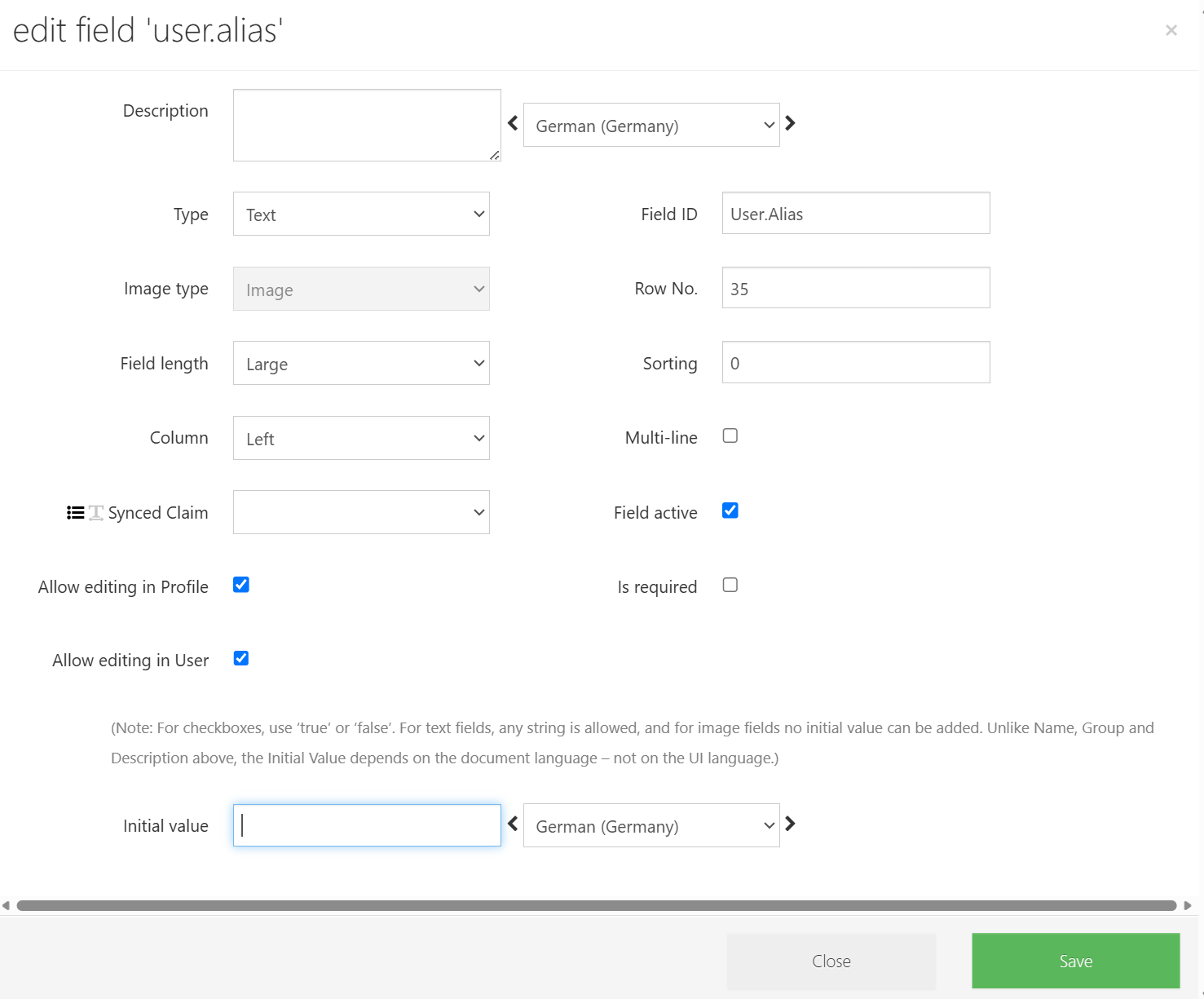
The initial value is set only at creation and never applied again. A later manual change to the field is therefore not overwritten — by design this is not a "default value".
- Text: the initial value can also be stored with a translation.
- Checkbox (yes/no):
trueorfalse.
Typical use case: newly created users should have a particular checkbox enabled by default, without a later manual change being overwritten by the static UserSync.
Offboarding
Users who can no longer be found in the corresponding authentication systems can also be deleted automatically via User synchronization
Profiles & Authorization Checks
To respond to authorization changes for organizational units and users, the Profile Onboarding upon Permission Loss feature can be used.
Profile Onboarding upon Permission Loss
This feature ensures that user profiles are only assigned organizational units for which the respective user actually has permission. If a user loses permission for one or more organizational units, the onboarding process is re-run for the affected profiles in order to correct the assignment — or to remove it if no suitable replacement organizational unit can be found.
Validation modes
The ProfileToOrganizationLinkValidator has three modes, configured in the dashboard under Settings → General Settings → ProfileOrganizationUnitValidationMode:
No Check— no check is performed.Propose new Org Id— the permissions of the assigned organizational unit are checked for all profiles. Profiles that have lost permission receive a replacement organizational unit as a proposal via a re-run of the profile onboarding (or a note that none was found). Existing proposals are removed at the start, since a user may have regained permission in the meantime. The proposals are visible in the User Editor (Security → More → editor).Apply new Org Id— works likePropose new Org Id, but assigns the determined organizational unit directly to the affected profiles, without a prior proposal.
The Apply new Org Id mode should be used with caution and only after a review with Propose new Org Id.
JobHost
As with the user synchronization, a DataSourceId can be specified for the ProfileToOrganizationLinkValidator. If omitted, the validator runs on all configured databases. Minimal call:
...\primedocs.JobHost.exe ProfileToOrganizationLinkValidator
| Short | Long | Required | Default | Description |
|---|---|---|---|---|
-d | --DataSourceId | false | null | GUID of the target database on the server. If omitted, the validator runs on all configured databases. |
Limitations
- The dashboard has no view to display all profiles and their proposed organizational units together and apply the changes.
- Proposed organizational units can become outdated if the user's permissions or the organizational units assigned to the profiles change after a run of the job.