Add-Ins (Web)
primedocs Add-In - Outlook (New)

primedocs is available for the web-enabled version of Outlook: Outlook (New). Outlook (New), and therefore also our primedocs add-in, behaves identically both in the desktop application and directly in the browser.
Opening the primedocs Add-In
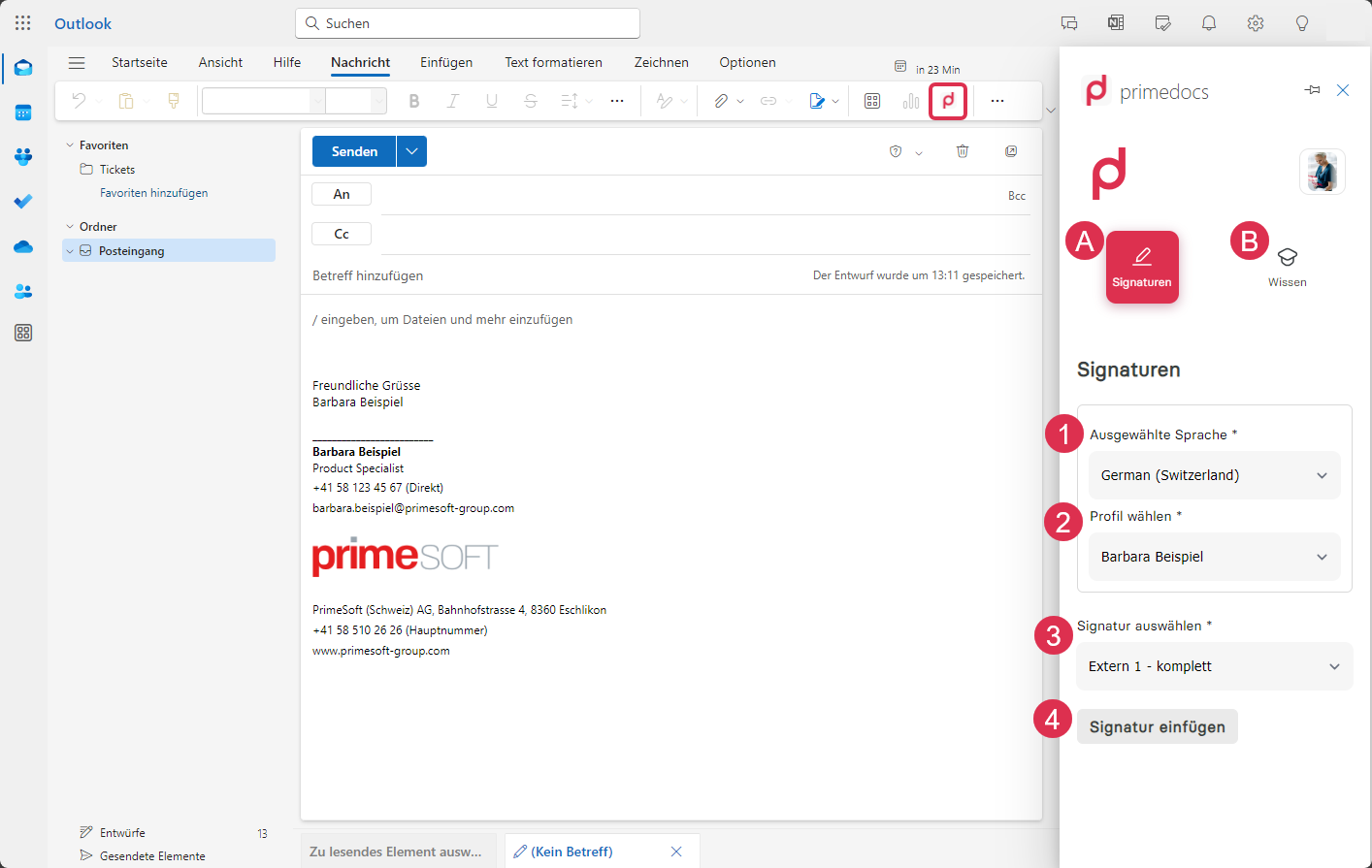
Click on New e-mail to write a message. A button with the primedocs signet then appears in the ribbon. Click on the primedocs signet to open the primedocs sidebar, i.e. the primedocs add-in.
primedocs Add-In in Outlook (New)
The layout of the sidebar is the same as in primedocs Web. You will therefore find the user button at the top right again, which is explained here: primedocs Web.
The Knowledge tab (B) offers exactly the same functionality as primedocs Web and is explained here: primedocs Web.
Signatures
In the Signatures tab (A), you can select which signature is to be inserted in your message.
If your organisation has configured the automatic insertion of email signatures, you will probably only open the sidebar if you want to use a different signature.
Inserting a signature in Outlook (New) is easy:
- In the Selected language selection list (1), select the language in which you are currently writing your message.
- Then select the desired profile (2) if you have more than one.
- Under Select signature (3), select the desired signature.
- Finally, click on the Insert signature button (4) to insert the signature.
Which signatures are available to you depends on the combination of document language and selected profile.
Snippets
In the Snippets tab you can insert predefined text blocks into your email. You can:
- switch between the Public, Personal, and Favorites areas,
- search for snippets and filter by document language,
- insert a snippet into the message body with a click,
- create, edit, and delete your own snippets and folders, and manage favorites (with the appropriate permission).
Insertion is aware of the message format: HTML snippets cannot be inserted into a plain-text email.