SCIM
Overview
primedocs provides a SCIM (System for Cross-domain Identity Management) interface.
SCIM is an open standard for consistently synchronizing user and group data between identity providers (e.g., Microsoft Entra ID) and applications. The goal is to provide standardized identity information and reduce administrative overhead.
We use SCIM as an alternative to Entra ID Application Permission access to synchronize users and groups. This allows for fine-grained control over which users are visible in the product and which are not.
Application scenario
This configuration is particularly useful if Entra ID application permission cannot or may not be granted.
The provisioning of users and groups is then controlled entirely via the new Entra ID app with SCIM provisioning.
Configuration
Prerequisites
- The
primedocs.configmust be adjusted:
- An entry for the desired SCIM tenant (
scimTenants) must be configured. - The corresponding data source must be equipped with this SCIM tenant.
- A description can be found here: primedocs.config
- In Entra ID, a new additional app is created for this purpose, which handles SCIM provisioning. The "App Registration"/"Enterprise Application" for authentication cannot be used for provisioning on the Entra ID side.
SCIM Endpoint
The SCIM endpoint is part of the WebApi and has the following schema::
https://[primedocs-instance]/webapi/scim-api/v1/[TENANT]/scim
If you have configured the SCIM tenant (...name="demo"...) and token (... token="TEST123456TEST!"...) in primedocs.config, the endpoint will be based on this scheme:
https://customer123.primedocs.io/webapi/scim-api/v1/demo/scim
Token: TEST123456TEST!
Available Properties
The available properties can also be queried via the schema endpoint.
User
The following standard attributes are supported in the minimal configuration:
externalIduserNameactivedisplayName
In addition, up to 16 additional optional fields can be synchronized:
urn:ietf:params:scim:schemas:extension:primedocs:2.0:User:customAttribute01urn:ietf:params:scim:schemas:extension:primedocs:2.0:User:customAttribute02urn:ietf:params:scim:schemas:extension:primedocs:2.0:User:customAttribute03urn:ietf:params:scim:schemas:extension:primedocs:2.0:User:customAttribute04urn:ietf:params:scim:schemas:extension:primedocs:2.0:User:customAttribute05urn:ietf:params:scim:schemas:extension:primedocs:2.0:User:customAttribute06urn:ietf:params:scim:schemas:extension:primedocs:2.0:User:customAttribute07urn:ietf:params:scim:schemas:extension:primedocs:2.0:User:customAttribute08urn:ietf:params:scim:schemas:extension:primedocs:2.0:User:customAttribute09urn:ietf:params:scim:schemas:extension:primedocs:2.0:User:customAttribute10urn:ietf:params:scim:schemas:extension:primedocs:2.0:User:customAttribute11urn:ietf:params:scim:schemas:extension:primedocs:2.0:User:customAttribute12urn:ietf:params:scim:schemas:extension:primedocs:2.0:User:customAttribute13urn:ietf:params:scim:schemas:extension:primedocs:2.0:User:customAttribute14urn:ietf:params:scim:schemas:extension:primedocs:2.0:User:customAttribute15urn:ietf:params:scim:schemas:extension:primedocs:2.0:User:customAttribute16
The form of customAttribute was chosen to provide the necessary flexibility during synchronization. The actual user synchronization in the primedocs system takes place via User synchronization.
In Entra ID, the configuration looks like this:

Important:
- Passwords are not synchronized.
- The actual authentication of users takes place exclusively via the stored Entra ID app for authentication: Entra ID Apps
Groups
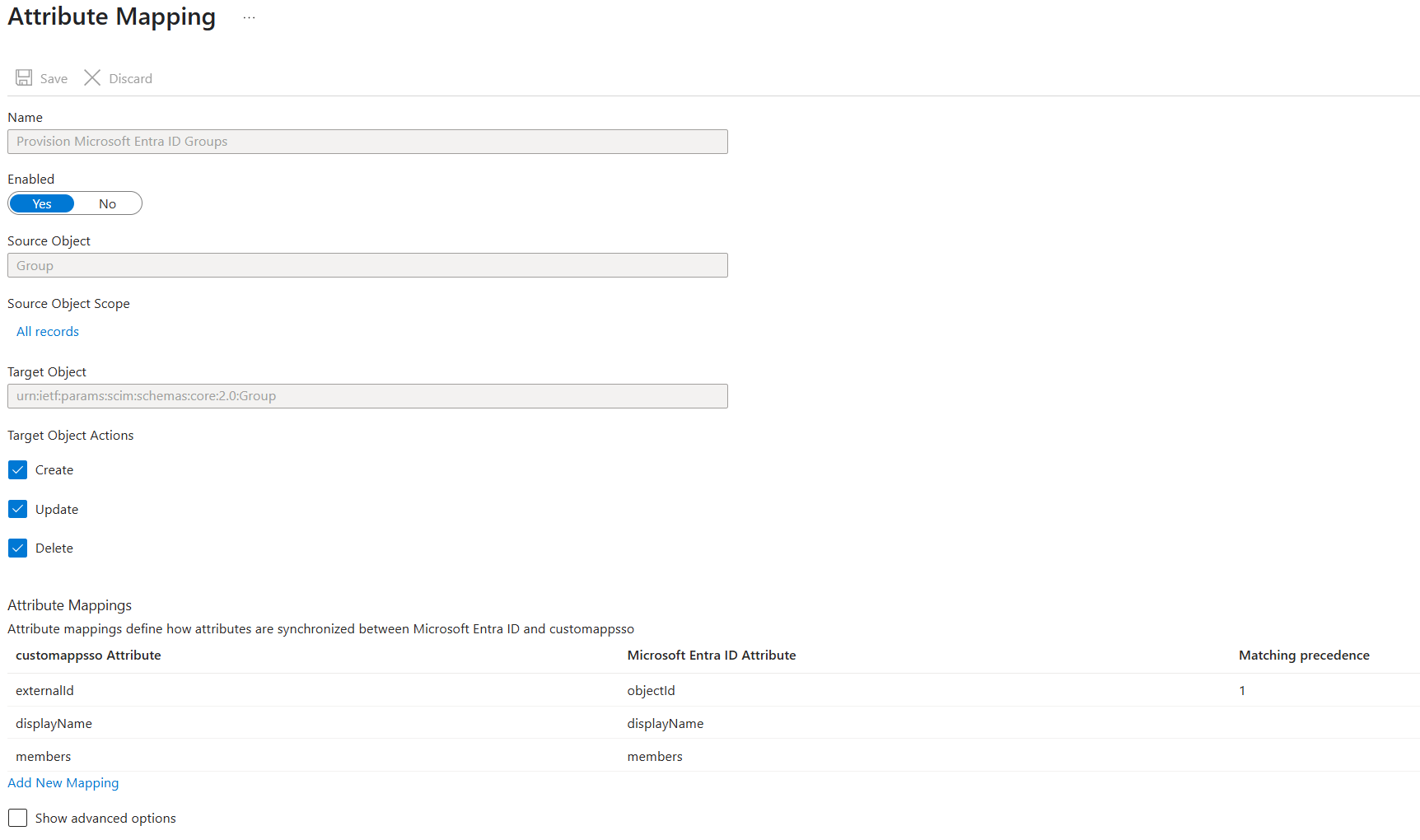
The following attributes are supported for groups:
externalIddisplayNamemembers(List of user IDs belonging to the group)
In Entra ID, the configuration looks like this:
Data removal
The process for permanently deleting users with the status active=false from the database is started by default 48 hours after deactivation by the JobHost.
This period can be adjusted via the primedocs.config configuration file using the deactivedUserRetentionHours attribute.
Only after deletion from the SCIM database can regular user offboarding begin.
Technical Details
- All SCIM data is stored in the operations database.
- Multiple SCIM tenants can be stored per instance.
- The DataSource is connected to a SCIM tenant. In this case, the PrincipalConnector operates in SCIM mode.
- Users and groups in the operations database form a kind of "shadow Entra ID."
- A SyncSource is available for user synchronization:
- SCIM (User synchronization)
- This ensures that the SCIM attributes (including up to 16 additional fields) can be mapped to the corresponding user fields in the primedocs database.